IMPORTANT DISCLAIMER: This guide references NFPA 101, Life Safety Code; NFPA 72, National Fire Alarm and Signaling Code; NFPA 3 (commissioning of fire protection and life safety systems); NFPA 4 (integrated fire protection and life safety system testing); NFPA 25 (inspection, testing, and maintenance of water-based systems); NFPA 1620 (pre-incident planning); the International Fire Code (IFC); the International Building Code (IBC); ISO 19650 (information management using building information modelling); ISO 16739-1 (Industry Foundation Classes, IFC); ISO/IEC 30173 (digital twin concepts and terminology); and buildingSMART International standards. Digital twin technology and its application to fire safety are evolving rapidly. There are no fire-code requirements for digital twins at this time. The Authority Having Jurisdiction (AHJ) may accept digital twin documentation as part of a fire safety plan, pre-incident plan, or records program, but this is jurisdiction-specific. This guide is a starting point only. Always verify the requirements for your project with your AHJ and a qualified fire protection engineer.
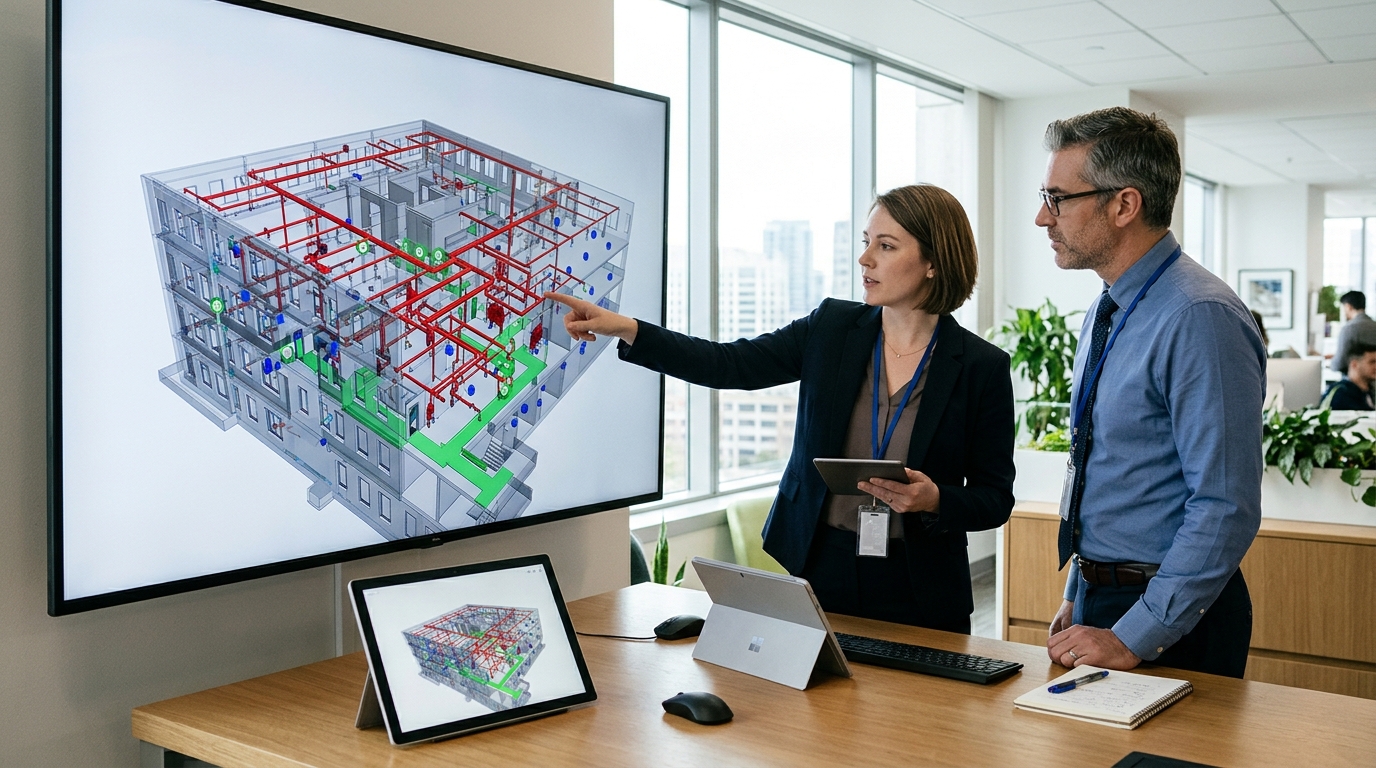
A digital twin is a virtual representation of a physical building, connected to real-time data from sensors, systems, and operations. For fire safety, the twin is not just a 3D model. It is a living model that reflects the current condition of the building, the status of its fire protection systems, and the location of hazards. It lets a facility manager, a fire safety director, or a firefighter see the building as it actually is, not as it was designed.
The term “digital twin” was introduced in the early 2000s for product lifecycle management and has been used in manufacturing and aerospace for years. Its application to fire safety is more recent. The BIM model created during design and construction holds a great deal of information that can be used throughout the building’s life, if it is verified, maintained, and connected to real-time data.
The twin does not replace the physical building, the fire protection systems, or the inspection and testing program. It is a tool that makes the building more legible, more manageable, and safer.
This article covers what a digital twin is, how it supports fire safety, the BIM and data foundation, the real-time connection (and how to protect listed life safety systems), cybersecurity and privacy, simulation, pre-incident planning, inspection and compliance records, and how to build a twin that is accurate, useful, and sustainable.
◆ Section 1: What a Digital Twin Is, and Is Not
A. Definitions
| Term | Definition |
|---|---|
| BIM model | A 3D model with data, created during design and construction; may include fire protection systems |
| Digital model | A virtual model with no automatic data connection to the physical building |
| Digital shadow | A virtual model that receives data from the physical building automatically, one way only |
| Digital twin | A virtual model with a data connection to the building that reflects its current state and supports decisions |
| Simulation | A model that predicts behavior under various conditions |
Note: Definitions vary between standards and vendors. Some definitions require two-way data flow. For fire protection systems, one-way, read-only data flow is the safe default (see Section 4).
B. What a Digital Twin Is
A digital twin:
- Represents the building’s geometry, systems, and components
- Is connected to real-time or near-real-time data
- Reflects the current state, not just the design state
- Supports decisions on operations, maintenance, and emergency response
- Is maintained and updated over the life of the building
C. What a Digital Twin Is Not
A digital twin is not:
- A 3D model that is not connected to data
- A BIM model that is not maintained after construction
- A replacement for inspection, testing, and maintenance
- A replacement for the fire alarm control unit, annunciator, or other listed equipment
- A guarantee of fire safety
- A code compliance tool
D. The Life Cycle
| Phase | Activity |
|---|---|
| Design | BIM model created; fire protection systems modeled |
| Construction | Model updated with as-built conditions |
| Commissioning | Model verified against installed systems (NFPA 3, NFPA 4) |
| Operation | Model connected to data; updated with changes |
| Maintenance | Model supports inspection, testing, and maintenance |
| Emergency | Model supports pre-incident planning and response |
| Renovation | Model updated with changes |
Key point: A digital twin is a living model connected to data. A 3D model that is not maintained is not a digital twin.
Key Article: Article 157 — Fire Safety in Smart Buildings and IoT Integration
Pro Tip: The value of a twin depends on its accuracy. A model that does not reflect the current building is worse than no model, because it creates false confidence.
◆ Section 2: How Digital Twins Support Fire Safety
A. Pre-Incident Planning
The twin gives firefighters a detailed, accurate view of the building before they arrive:
| Information | Use |
|---|---|
| Floor plans and 3D geometry | Navigation and orientation |
| Fire protection systems | Location of sprinklers, standpipes, FDC, fire pump, alarm panels |
| Hazardous materials | Location and quantity |
| Occupancy and egress routes | Occupancy type, exits, areas of refuge |
| Access points | Doors, stairs, elevators, roof access, key box |
| Utility shutoffs | Gas, electric, water |
B. Emergency Response
During an incident, the twin can provide:
- Alarm activation location
- Sprinkler flow location
- System status (normal, impaired, in trouble)
- Occupant counts or locations, where permitted
- Access routes
The fire alarm control unit and annunciator remain the authoritative source during an incident. The twin supplements them.
C. Inspection, Testing, and Maintenance
The twin supports ITM by tracking each device’s location and status, recording test results, identifying overdue items, and visualizing deficiencies and impairments.
D. System Performance Analysis
The twin can support simulation of fire and smoke, egress, detection response, and suppression performance.
E. Compliance Documentation
The twin can serve as a repository for as-built drawings, ITM records, deficiency records, and impairment records. Whether digital records satisfy the AHJ is a local decision, so confirm it.
Key point: The twin supports fire safety across the building’s life: pre-incident planning, response, ITM, performance analysis, and records.
Pro Tip: Start with the use case that addresses your biggest challenge. If pre-incident planning is the priority, build for that first.
◆ Section 3: The BIM and Data Foundation
The twin is built on a BIM model and a structured asset database. The quality of that foundation determines the quality of the twin.
A. Standards
| Standard | Scope |
|---|---|
| ISO 19650 | Information management over the life cycle of built assets |
| ISO 16739-1 (IFC) | Open data format for BIM exchange |
| buildingSMART | International openBIM standards, including data dictionaries and BCF issue exchange |
| NBIMS-US (NIBS) | National BIM Standard, United States |
| ISO/IEC 30173 | Digital twin concepts and terminology |
B. Fire Protection Content in the Model
The model should include:
- Sprinkler and standpipe layouts and components, including control valves
- Fire alarm devices and panels
- Fire pump, controller, and tank locations
- Fire protection equipment rooms
- Fire-rated assemblies, smoke barriers, and fire dampers
- Means of egress, including areas of refuge
- Hazardous material locations
- Firefighter access features
Define the level of information need for each element (ISO 19650). A sprinkler head needs a unique ID, location, type, and ITM history. It does not need the detailed geometry of a fire pump casing.
C. Unique Identifiers and Naming
Every device and asset needs a unique ID that is the same in the BIM model, the asset database, the ITM records, and the field label. Without consistent IDs, the real-time data cannot be matched to the model.
D. Accuracy and Existing Buildings
For new buildings, accuracy comes from as-built verification, change management, and quality control. For existing buildings, where most fire safety work happens, the model may not exist or may be out of date. Reality capture (laser scanning or photogrammetry, then “scan-to-BIM”) can create or verify the model. Field verification of fire protection devices is still required.
E. COBie Handover
COBie (Construction Operations Building Information Exchange) is a data format for handing over equipment and asset data from construction to operations. It can populate the twin’s asset register.
Key point: The BIM model and asset data are the foundation. They must be accurate, uniquely identified, and maintained.
Key Article: Article 75 — How to Integrate Fire Safety with Building Information Modeling (BIM)
Pro Tip: Specify twin requirements in the BIM Execution Plan and the owner’s information requirements: which systems, which data fields, which IDs, and which update procedures.
◆ Section 4: The Real-Time Connection
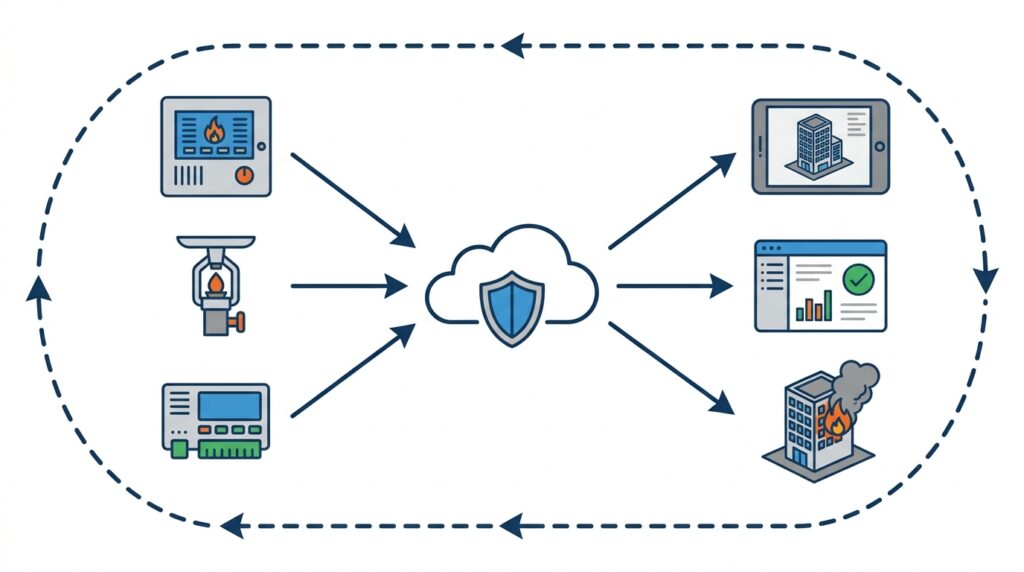
The connection to live data is what distinguishes a twin from a static model. It is also the part that carries the most risk for life safety systems.
A. Data Sources
| Source | Data |
|---|---|
| Fire alarm control unit | Device status, alarms, supervisory and trouble signals |
| Sprinkler and standpipe systems | Valve position (tamper), pressure, flow |
| Fire pump controller | Run status, pressure, power and phase alarms |
| Building automation system | HVAC status, smoke control status, temperatures |
| Access control | Door status, occupancy counts |
| Occupant tracking | Location (where permitted; see Section 5) |
| Video | Feeds (where integrated and authorized) |
B. Data Architecture
The integration requires:
- A data platform (cloud or on-premises)
- Interfaces to source systems (commonly BACnet, Modbus, OPC UA, or vendor APIs)
- A consistent data model (for example, tagging by device ID and type)
- Data normalization and validation
- Access control and logging
C. Protecting Listed Fire Protection Systems
This is the most important design rule in this article.
- Do not compromise the fire alarm or suppression system. Fire alarm systems are listed systems (UL 864 and NFPA 72 in the U.S.). Connecting third-party software to them must not degrade their operation or listing.
- Use read-only connections. Use manufacturer-approved gateways or interfaces, or one-way mechanisms such as data diodes. Do not allow the twin to send commands to life safety systems unless the system is listed and designed for it.
- Failure of the twin must not affect the system. If the platform, network, or cloud service goes down, the fire alarm and suppression systems must operate normally.
- Coordinate with the system manufacturer and the AHJ before connecting.
- Keep the connection under change control. Firmware updates and panel reprogramming can break or alter the interface.
D. Data Quality
Typical problems are incomplete, inaccurate, delayed, or missing data (during outages), uncalibrated sensors, and mismatched IDs. Validate the data before relying on it. Display a timestamp and “last updated” status on every live data point, so users can tell stale data from current data.
E. Degraded Modes and Offline Access
The twin must be usable when things go wrong. Firefighters and facility staff need:
- An offline or cached copy of the twin and pre-incident plan (for example, on a tablet or in a fire command center)
- A printed or otherwise independent backup of key information (floor plans, riser locations, FDC)
- Clear indication when live data is unavailable
Key point: The connection makes the twin a twin, but it must be read-only toward life safety systems, validated, timestamped, and designed to fail safely.
Pro Tip: Start with a few data sources. Verify quality before expanding.
◆ Section 5: Cybersecurity and Privacy
A. Cybersecurity
The connection to fire protection systems adds attack surface (Article 157). Basic measures:
- Network segmentation between the twin platform and life safety networks
- Read-only or one-way interfaces to life safety systems
- Encryption of data in transit and at rest
- Role-based access control, multi-factor authentication, and audit logs
- Vendor security requirements and patch management
- Alignment with recognized frameworks (for example, IEC 62443 for industrial and building control systems, UL 2900-1 for product cybersecurity, and the NIST Cybersecurity Framework)
- Incident response procedures that cover the twin platform
B. Sensitive Building Information
A detailed model of a building is sensitive. It shows egress, security, and critical systems. Define who can see what, how data is shared with the fire department, and how it is protected in transit and storage.
C. Privacy
Occupant tracking and video raise privacy and legal issues. Requirements vary by jurisdiction and may include data protection and employment laws. Practical steps:
- Collect only what the fire safety use case needs (for example, counts by zone rather than named individuals)
- Define purpose, retention, and access
- Consult legal counsel and, where applicable, employee representatives before deployment
Key point: Cybersecurity and privacy are design requirements, not afterthoughts.
◆ Section 6: Simulation Capabilities
A. Fire and Smoke Simulation
Fire models (for example, FDS and CFAST, both from NIST) predict fire growth, smoke movement, temperature, visibility, and toxicity.
B. Egress Simulation
Egress models (for example, Pathfinder and STEPS) predict occupant movement, exit usage, evacuation time, and bottlenecks.
C. System Response Simulation
Models can predict detection response, sprinkler activation, smoke control performance, and notification coverage.
D. Use Cases
| Use Case | Purpose |
|---|---|
| Design verification | Check that the design meets performance criteria |
| Pre-incident planning | Predict fire and egress conditions |
| Training | Train staff and firefighters on building response |
| Post-incident analysis | Understand what happened and why |
| Retrofit evaluation | Evaluate the impact of proposed changes |
E. Limitations
Simulation is a model, not reality. Most fire and egress simulations run offline on a specified scenario. They are not predicting a live fire in real time. Results depend on:
- Input data and assumptions (fire size, growth rate, occupant behavior)
- The suitability of the model for the scenario
- Verification and validation of the model and software (for example, ASTM E1355 addresses evaluating the predictive capability of deterministic fire models)
- The expertise of the analyst
Key point: Simulation supports decisions. It does not make them. A qualified fire protection engineer must interpret the results, and performance-based design must be accepted by the AHJ.
Pro Tip: Document assumptions and keep the simulation inputs linked to the model, so the analysis can be updated when the building changes.
◆ Section 7: Pre-Incident Planning and Fire Department Integration
A. What Pre-Incident Planning Is
Pre-incident planning is gathering information about a building before an incident, so that responders can act effectively. NFPA 1620 provides the standard framework for it.
B. The Twin Advantage
The twin can provide accurate geometry, system locations and status, hazards, access points, and utility shutoffs, in a form that is easier to keep current than paper plans.
C. Integration with Fire Department Systems
The twin can feed, or be linked to:
- Computer-aided dispatch (CAD)
- Mobile data terminals and tablets
- Pre-incident plan databases
Agree on data formats and exchange methods with the fire department. They may use specific platforms.
D. What Firefighters Need
Information must be accurate, current, accessible, and actionable. A simple, clear view often beats a complex 3D model. Typical needs are:
- Building address, access, and key box location
- Riser and FDC locations, standpipe connections, and pump room
- Alarm panel location and annunciator
- Stair and elevator layout, areas of refuge, and rated shafts
- Hazards and utility shutoffs
- Current impairments
E. Keeping the Plan Current
Define triggers for updating the pre-incident plan: renovations, occupancy changes, hazard changes, and system impairments. Review it on a set schedule and after drills.
Key point: Pre-incident planning is one of the most valuable uses of the twin, but only if the fire department helps define it and can use it under real conditions, including without network access.
Key Article: Article 69 — How to Design Firefighter Access and Building Features for Rescue Operations
Pro Tip: Involve the fire department from the start. Their needs determine what data to include and how to present it.
◆ Section 8: Inspection, Testing, Maintenance, and Records
A. ITM Support
The twin can link each device to its ITM schedule and history (NFPA 25 for water-based systems, NFPA 72 for fire alarm systems), show overdue items, and record results from mobile inspections.
B. Impairment Management
When a system is impaired, the twin can show the impaired zone, start the impairment notification process, and track restoration. It supports the impairment program but does not replace it.
C. Deficiency Tracking
Link deficiencies to a device and location in the model. Track corrective action to closure.
D. Records
Many codes require records to be kept for specified periods and to be available to the AHJ. If records live in the twin:
- Confirm that the AHJ accepts electronic records and the format
- Use controlled, tamper-evident storage with backups
- Keep records retrievable even if the twin platform changes or the vendor goes away
E. Predictive Maintenance
Trend data (for example, pump run times, repeated trouble signals, or pressure drift) can flag components that are likely to fail. Use it as an addition to required ITM, not a substitute.
Key point: The twin makes ITM easier to manage and verify, but required inspection, testing, and maintenance still have to be performed as the code requires.
◆ Section 9: Building and Maintaining a Digital Twin
A. The Build Process
| Phase | Activity |
|---|---|
| 1. Define | Define use cases, requirements, and success metrics |
| 2. Assess | Assess the BIM model, asset data, and data sources |
| 3. Design | Design the data architecture, security, and platform |
| 4. Build | Build the model and integrate the data |
| 5. Test | Test accuracy, functionality, and failure behavior |
| 6. Deploy | Deploy and train users, including the fire department |
| 7. Maintain | Maintain and update as conditions change |
B. Maintenance Triggers
Update the twin when systems are modified, the building is renovated, equipment is replaced, or data sources change. Tie updates to your management of change process and to renovation permits, so that the twin is not forgotten (NFPA 241 applies to construction and alteration safeguards).
C. Governance and Ownership
Define who owns the twin, who updates it, who has access, how changes are approved, and how data is retained. Assign ownership to a specific role. An unowned twin will not be maintained.
D. Cost, Value, and Sustainability
Estimate both build and ongoing costs (licenses, sensor and integration upkeep, staff time). Define metrics that show value, for example:
- Time to find information or equipment
- Percentage of devices with current ITM records
- Number of overdue inspections
- Pre-incident plan accuracy at drills
- Response and drill outcomes
Insurers or the fire department may value some of these, but do not assume any code credit or premium reduction without confirmation.
E. Open Standards and Vendor Lock-In
Require open formats (IFC, COBie, open APIs) and a data export capability, so the data stays usable if the platform changes.
Key point: The twin is not a one-time project. It is a living system that needs ongoing maintenance and governance.
Pro Tip: Start with a pilot: one building, a few systems, and a defined use case. Demonstrate value, then expand.
◆ Section 10: Common Challenges and Mistakes
| Challenge or Mistake | Why It Happens | Solution |
|---|---|---|
| BIM model inaccurate | Not as-built verified | Field verification; reality capture |
| Twin not maintained | No governance | Assign ownership; tie to change management |
| Inconsistent device IDs | No naming standard | Define unique IDs early |
| Live data poorly matched or stale | Sensor and integration issues | Validation; timestamps |
| Life safety system affected by integration | Poorly designed connection | Read-only, manufacturer-approved interfaces; AHJ coordination |
| Twin unusable during an incident | Network or power loss | Offline copy; printed backup |
| Cybersecurity weakness | Connected systems | Segmentation; encryption; access control |
| Privacy complaints | Unplanned occupant tracking | Data minimization; legal review |
| Fire department not engaged | Not involved | Engage early |
| Over-reliance on simulation | Treated as prediction | Engineer review; validation |
| Everything attempted at once | Scope creep | Pilot; phased approach |
| Cost underestimated | Not planned | Budget build and maintenance |
| Vendor lock-in | Proprietary platform | Open standards; export rights |
Key point: Most twin failures are governance and maintenance failures, not technical ones. The twin is built but not maintained, or the data is never validated.
◆ Section 11: Design Checklist
| Item | Status | Notes |
|---|---|---|
| Use cases defined | ☐ | Pre-incident planning, ITM, simulation |
| BIM model and asset data assessed | ☐ | Accuracy, completeness, unique IDs |
| Existing-building verification planned | ☐ | Reality capture, field check |
| Level of information need defined | ☐ | Per element, per use case |
| Data sources identified | ☐ | Fire alarm, sprinkler, pump, BAS |
| Data architecture designed | ☐ | Platform, interfaces, timestamps |
| Life safety interface approach agreed | ☐ | Read-only; manufacturer and AHJ input |
| Cybersecurity measures specified | ☐ | Per Article 157 |
| Privacy review completed | ☐ | Occupant data |
| Fire department engaged | ☐ | Requirements, format, offline access |
| AHJ requirements confirmed | ☐ | Documentation and records acceptance |
| Governance defined | ☐ | Ownership, updates, access |
| Maintenance plan and change triggers | ☐ | Link to management of change |
| Cost estimated (build and maintain) | ☐ | Licenses, staff, upkeep |
| Metrics defined | ☐ | Value demonstration |
| Open standards and data export required | ☐ | Avoid lock-in |
| Pilot planned | ☐ | One building, few systems |
◆ Section 12: Conclusion
A digital twin is a virtual representation of a physical building, connected to data, and used to support decisions about the building. For fire safety, it supports pre-incident planning, emergency response, inspection and maintenance, performance analysis, and records.
The critical elements are:
- BIM and data foundation: accurate, uniquely identified, and maintained
- Real-time connection: validated, timestamped, and read-only toward life safety systems
- Cybersecurity and privacy: designed in from the start
- Simulation: used to support engineering judgment
- Pre-incident planning: built with the fire department, usable offline
- Governance and maintenance: clear ownership and update triggers
The most common failure is treating the twin as a one-time project. A twin that is not maintained becomes obsolete, and an inaccurate twin is worse than none.
Key Takeaways:
- A digital twin is a virtual model connected to data. A 3D model alone is not a twin.
- The BIM model and asset data are the foundation and must be accurate and maintained.
- The data connection must never compromise listed fire alarm or suppression systems.
- The twin must still be usable when the network is down.
- Simulation supports decisions but does not replace engineering judgment.
- Pre-incident planning is among the most valuable uses; engage the fire department early.
- Cybersecurity, privacy, governance, and maintenance are essential.
- The twin supports ITM and records but does not replace required inspection and testing.
- Start small, demonstrate value, then expand.
Take Action Today:
- Define the use cases and success metrics.
- Assess the BIM model and asset data; plan field verification.
- Identify data sources and how they will connect safely.
- Agree on a read-only interface approach with the system manufacturers and the AHJ.
- Design the data architecture, cybersecurity, and privacy measures.
- Engage the fire department on requirements and offline access.
- Confirm AHJ acceptance of digital documentation.
- Define governance, ownership, and change triggers.
- Estimate build and ongoing costs.
- Plan a pilot with one building and a few systems.
- Document lessons learned and expand.
Continue Reading from Our Series:
- Related guide: Article 157 — Fire Safety in Smart Buildings and IoT Integration
- Related guide: Article 75 — How to Integrate Fire Safety with Building Information Modeling (BIM)
- Related guide: Article 69 — How to Design Firefighter Access and Building Features for Rescue Operations
- Read more: Article 159 — Drone and Robotics Applications in Fire Safety (planned)
About This Guide: This article is part of a series on commercial building fire safety, written for facility managers, architects, and code officials. It references model codes and standards for educational purposes. Always consult your local AHJ and a qualified fire protection engineer for project-specific requirements.